Products · DMS · CRM & engagement

One shared record of
every conversation.

Every note, email, call and task about a parish, benefice, person or case — in one chronological timeline, whoever recorded it. This is the core record the other 25+ areas hang from, and the reason the per-team spreadsheets finally retire.

1
Timeline per record
Teams
Cross-team visibility
0
Duplicate address books
Self
Updating segments
The shared record

Three habits the whole office gains.

Check before you call, trust the contact record, and let the lists maintain themselves.

The engagement timeline.

Everything about a parish or person in one chronological view — notes, emails, calls, tasks — searchable free-text across the whole system, and printable as a full-history summary for any record.

The cross-team panel.

See what other teams have been doing with a parish before you pick up the phone — scoped deliberately, so teams share awareness without sharing what shouldn’t travel. How visibility is controlled →

Contacts without duplicates.

People linked to their roles, parishes, training, DBS and history — with duplicate detection, side-by-side merge, and a creation wizard that checks for near-matches as you type.

In the detail

Engagement, organised.

The everyday machinery — lists, boards, journeys and worklists — built into the same record everyone shares.

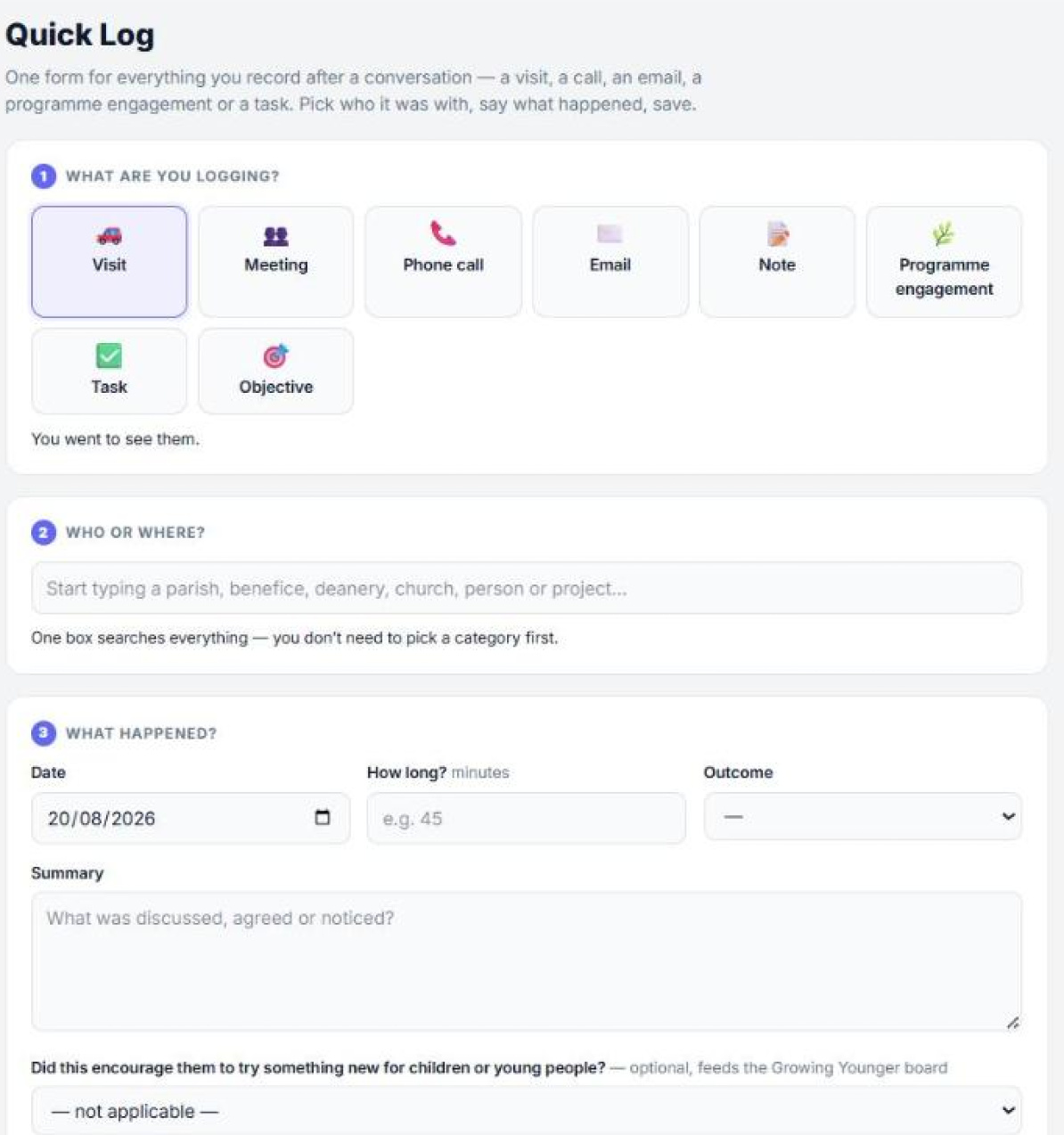
Quick Log

The reason the timeline has anything on it. One form for a visit, call, email, meeting, note or task — one box that searches parishes, benefices, deaneries, churches, people and projects together, so nobody has to pick a category first. Under a minute, from the car park.

Tags, segments & audiences

Dynamic segments like “treasurers in vacancy parishes” that update themselves — with lifecycle stages and configurable scoring for engagement journeys.

Pipelines & Kanban boards

Drag-and-drop boards for any process — grant rounds, vacancies, projects — with stage forms and owners.

Campaign sequences

Multi-step, scheduled communication journeys with enrolment rules — the follow-up happens because it was designed, not remembered.

Tasks & My Inbox

A unified personal worklist with snooze, dismiss and team assignment — one place to look each morning instead of four.

Calls through Teams

Click-to-dial from any contact record via Microsoft Teams, with automatic call logs landing on the timeline. See integrations →

Feeds every other area

Safeguarding, finance, church care and the portal all read the same contacts and engagement spine — one record, one place.

Before / after

The phone call, then and now.

A representative moment, not a specific client’s story — where the shared record earns its keep.

Before
  • Each team keeps its own contact spreadsheet; three of them disagree about the treasurer.
  • You call a churchwarden, unaware safeguarding spoke to them yesterday.
  • Finding “that email from the spring” means searching four inboxes.
  • Mailing lists rebuilt by hand for every send.
After
  • One contact record, linked to roles, training, DBS and history.
  • The cross-team panel shows recent contact before you dial.
  • Free-text engagement search finds the note in seconds, whoever wrote it.
  • Segments update themselves as roles and parishes change.
What it looks like

On screen.

Getting it in, and getting it back out again.

Quick Log form for recording a visit, call, email, meeting or task
Quick LogThe reason the timeline has anything on it. Pick what it was, type the parish or person into one box — it searches parishes, benefices, deaneries, churches, people and projects together — say what happened, save.
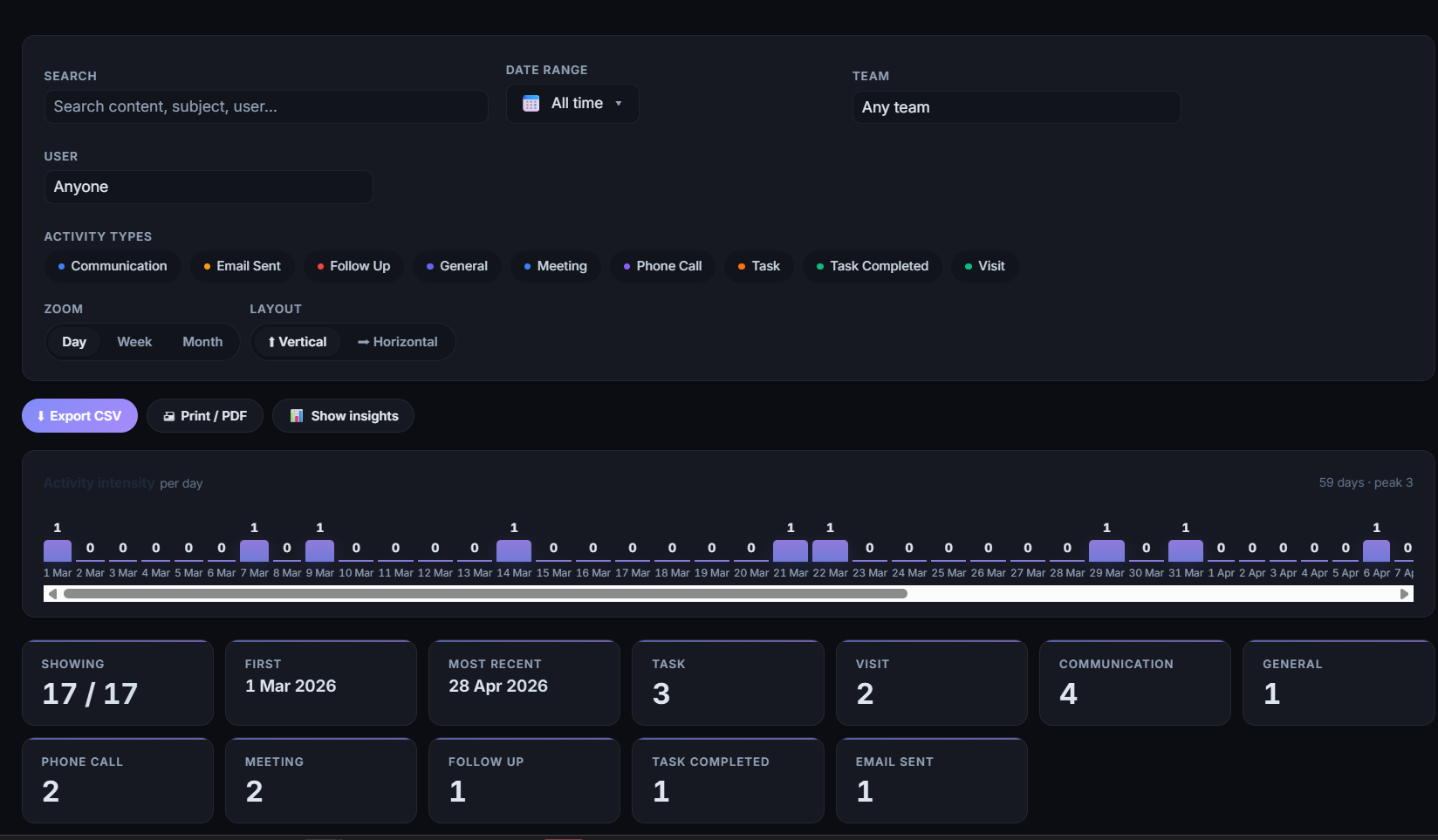
Engagement search filtered by activity type, team and date
Search across teamsEvery engagement filtered by type, team, person and date — with the activity intensity over the period above it, and CSV or PDF out.
The prayer diary

The diocese’s cycle of prayer, generated.

Compiled from the same records as everything else, rather than retyped each month.

Today, on screen

A “pray today” view for anyone who wants the day’s entry without the whole month — usable from a phone at morning prayer.

A month at a time, as a PDF

Each month streams as a typeset A4 document for printing, circulation or the diocesan website, carrying the diocesan identity rather than looking like a system export.

Why it earns its place

It is the one diocesan output that reaches every parish every month, so an out-of-date name or parish in it is noticed straight away. Generating it from the live register is the difference between a correction and an apology.

Every diocesan spreadsheet is really a copy of a conversation somebody was afraid of losing. Keep the conversation itself, and the copies stop.
— Read more: One record, one place · The shadow spreadsheet problem
Next step

Count your contact
spreadsheets first.